Android
안드로이드 네이버 로그인 API 자바 연결하기 /JAVA/Android/NaverLogin
어렵지만
2024. 5. 15. 17:02
남들 1~3시간 걸리는거 난 반나절이 뭐야 어제 저녁밤 부터했으니까 하루가 걸렸네.... 진짜 왜이렇게 어렵냐 현타..
네이버 개발자 홈페이지
앱등록하자
https://developers.naver.com/apps/#/list
애플리케이션 - NAVER Developers
developers.naver.com
앱등록부터 ㅅㅣ작하자.

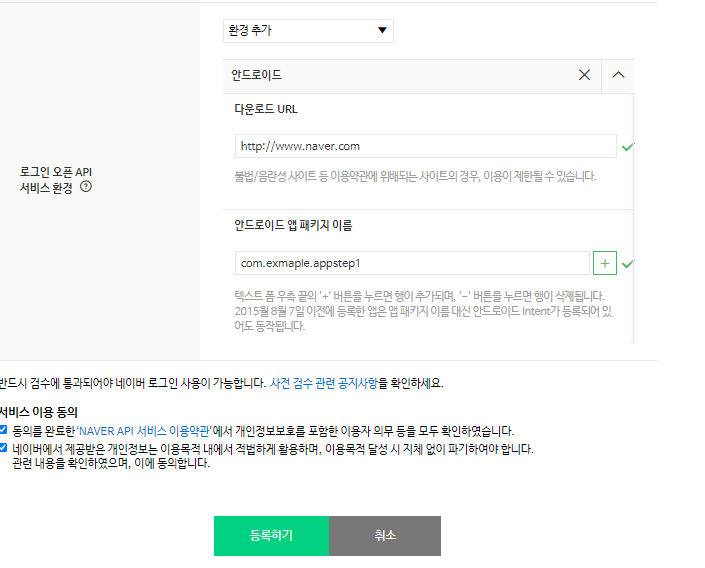
애플리케이션 이름은 원하는것으로 하면 된다.
사용 API는 네이버 로그인으로 선택하고
다운로드 URL는 아직 사용을 안할거니 네이버로 경로지정 (아무거나상관없음)
안드로이드 앱 패키지 이름 자신이 만들고있는 안드로이드 패키지 이름을 입력하고 등록합니다
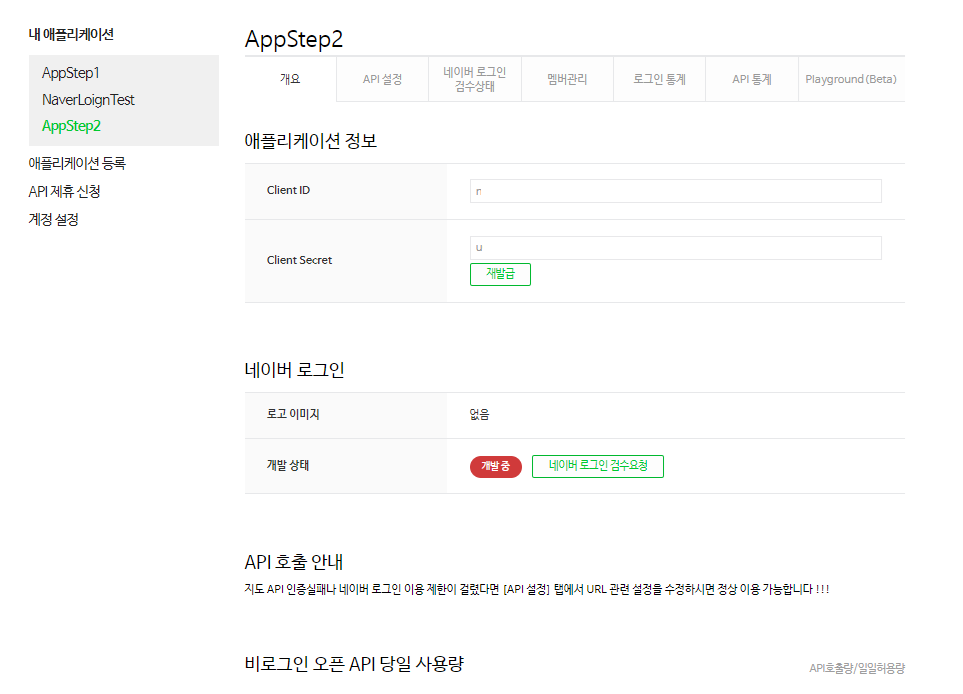
등록을 마치면 Client ID 와 Client Secret 을 발급 받게 됩니다.
안드로이드로 갑니다
네이버에서 2가지로 로그인이 가능한데
첫 번째는 NidOAuthLoginButton 객체를 레이아웃에 추가하여 사용하는 방법
두 번째는 NaverIdLoginSDK.authenticate() 메서드를 직접 실행하는 방법.
첫번째 방법인 버튼으로 해보겠습니다.
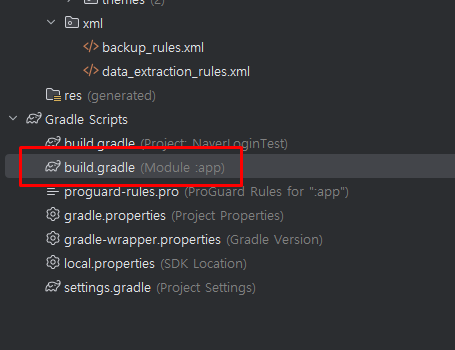
의존성 추가해 줍니다.
implementation 'com.navercorp.nid:oauth:5.9.1' // jdk 11
추가로 더 해줍니다
implementation 'org.jetbrains.kotlin:kotlin-stdlib:1.8.22'
implementation 'org.jetbrains.kotlinx:kotlinx-coroutines-android:1.7.1'
implementation 'androidx.appcompat:appcompat:1.6.1'
implementation 'androidx.legacy:legacy-support-core-utils:1.0.0'
implementation 'androidx.browser:browser:1.8.0'
implementation 'androidx.constraintlayout:constraintlayout:2.1.4'
implementation 'androidx.security:security-crypto:1.1.0-alpha06'
implementation 'androidx.core:core-ktx:1.13.1'
implementation 'androidx.fragment:fragment-ktx:1.7.0'
implementation 'androidx.lifecycle:lifecycle-viewmodel-ktx:2.7.0'
implementation 'com.squareup.retrofit2:retrofit:2.9.0'
implementation 'com.squareup.retrofit2:converter-gson:2.9.0'
implementation 'com.squareup.moshi:moshi-kotlin:1.11.0'
implementation 'com.squareup.okhttp3:logging-interceptor:4.9.2'
implementation 'com.airbnb.android:lottie:3.1.0'
아래 사진은 제가 작성한거니 참고만 하세요

Values 들어가서

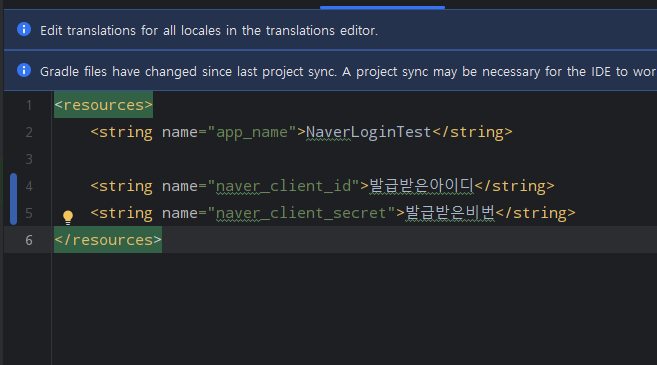
추가해줍니다.
<string name="naver_client_id">네이버발급아이디</string>
<string name="naver_client_secret">네이버발급비번</string>
MainActivity.class
import androidx.appcompat.app.AppCompatActivity;

import android.os.Bundle;
import android.util.Log;
import android.view.View;
import android.widget.TextView;

import androidx.annotation.NonNull;
import com.navercorp.nid.NaverIdLoginSDK;
import com.navercorp.nid.oauth.OAuthLoginCallback;
import com.navercorp.nid.oauth.view.NidOAuthLoginButton;

public class MainActivity extends AppCompatActivity {

    @Override
    protected void onCreate(Bundle savedInstanceState) {
        super.onCreate(savedInstanceState);
        setContentView(R.layout.activity_main);

        //뷰 객체 연결
        TextView textView = findViewById(R.id.textView);
        NidOAuthLoginButton btnLogin = findViewById(R.id.btn_login);

        //네아로 객체 초기화
        NaverIdLoginSDK.INSTANCE.initialize(this, getString(R.string.naver_client_id),
                getString(R.string.naver_client_secret), getString(R.string.app_name));


        btnLogin.setOAuthLogin(new OAuthLoginCallback() {
            @Override
            public void onSuccess() {
                // 로그인 성공시
                // 액세스 토큰 가져오기
                String accessToken = NaverIdLoginSDK.INSTANCE.getAccessToken();
                textView.setText(accessToken);
                btnLogin.setVisibility(View.GONE);
            }

            @Override
            public void onFailure(int httpStatus, @NonNull String message) {
                // 통신 오류
                Log.e("네아로", "onFailure: httpStatus - " + httpStatus + " / message - " + message);
            }

            @Override
            public void onError(int errorCode, @NonNull String message) {
                // 네이버 로그인 중 오류 발생
                Log.e("네아로", "onError: errorCode - " + errorCode + " / message - " + message);
            }
        });
    }
}
activity_main.xml
<?xml version="1.0" encoding="utf-8"?>
<androidx.constraintlayout.widget.ConstraintLayout xmlns:android="http://schemas.android.com/apk/res/android"
    xmlns:app="http://schemas.android.com/apk/res-auto"
    xmlns:tools="http://schemas.android.com/tools"
    android:id="@+id/main"
    android:layout_width="match_parent"
    android:layout_height="match_parent"
    tools:context=".MainActivity">

    <TextView
        android:id="@+id/textView"
        android:layout_width="300dp"
        android:layout_height="wrap_content"
        android:text="네이버 로그인 테스트"
        android:textAlignment="center"
        app:layout_constraintBottom_toBottomOf="parent"
        app:layout_constraintEnd_toEndOf="parent"
        app:layout_constraintStart_toStartOf="parent"
        app:layout_constraintTop_toTopOf="parent" />

    <com.navercorp.nid.oauth.view.NidOAuthLoginButton
        android:id="@+id/btn_login"
        android:layout_width="wrap_content"
        android:layout_height="50dp"
        android:layout_marginBottom="50dp"
        app:layout_constraintBottom_toBottomOf="parent"
        app:layout_constraintEnd_toEndOf="parent"
        app:layout_constraintStart_toStartOf="parent" />

</androidx.constraintlayout.widget.ConstraintLayout>
매니페스트
인터넷연결 추가
<uses-permission android:name="android.permission.INTERNET" />
<uses-permission android:name="android.permission.ACCESS_NETWORK_STATE" />
실행화면
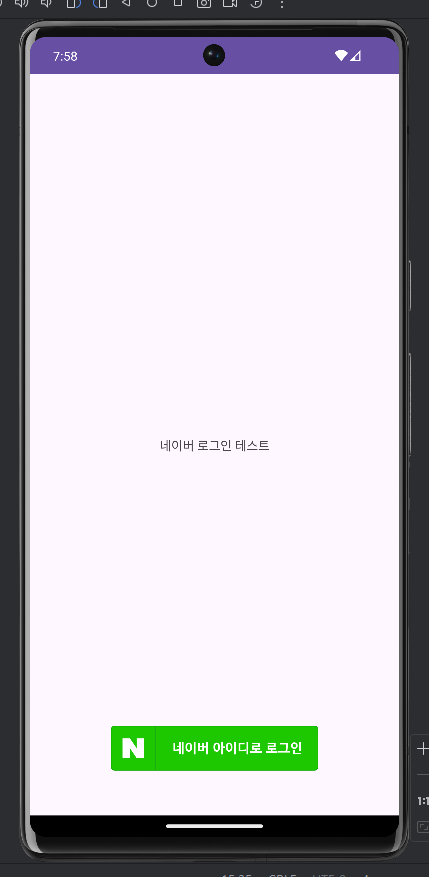


개인토큰값이 출력되면 연결이 된것을 확인 할 수 있습니다.
다음에 올릴글은 개인토큰값으로 네이버 서버에 연결해서 로그인된 유저의 정보를 가져오는것을 할것입니다!